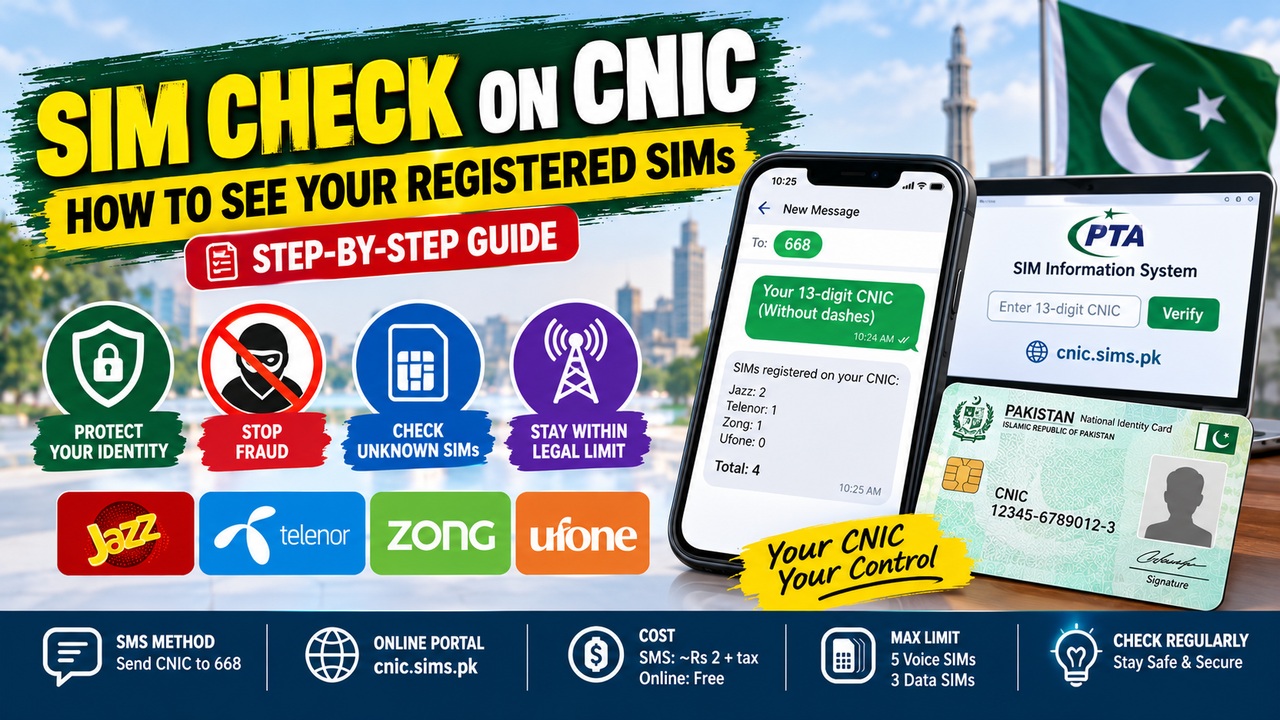
A SIM check on CNIC lets you see every SIM registered in your name in Pakistan. Moreover, it is a simple, official PTA service that protects your identity. In this post, you will learn two easy ways to check your SIMs. Furthermore, this guide covers reading results, unknown SIMs, and staying safe.
To begin, many people never check how many SIMs are in their name. Specifically, criminals can register SIMs on your CNIC without your knowledge. As a result, a quick SIM check on CNIC is very important. Therefore, this guide shows you exactly how to do it.
Why Check SIMs on Your CNIC?
Checking your SIMs is a serious safety step. Firstly, it protects you from identity theft. Secondly, it reveals any SIM you did not buy. Thirdly, it helps you stay within the legal limit. So, it is worth doing regularly.
Unknown SIMs can cause real trouble. Specifically, a SIM in your name could be misused. Moreover, criminals may use it for fraud or crime. Additionally, you could face blame you never earned. Therefore, a regular check keeps you safe.
The process gives you full control. Specifically, it lets you find and block unknown SIMs. Moreover, it keeps your identity protected. Therefore, a quick check brings real peace of mind. Indeed, prevention is always better than trouble.
Two Ways to Check
The PTA offers two official checking methods. Basically, you can use SMS or a website. So, you can pick whichever suits you. The table below shows both.
Method
How to Use
Cost
SMS
Send 13-digit CNIC (no dashes) to 668
About Rs 2 + tax
Online portal
Enter your CNIC at cnic.sims.pk
Free
As the table shows, both methods are quick and easy. Moreover, the SMS option works on any phone. Additionally, the website is completely free. Therefore, a SIM check on CNIC takes only a minute. Below, each method is explained.
Method 1: Check via SMS (668)
The SMS method is the easiest option. Basically, you just send your CNIC to a short code. So, it works on any phone and network. Moreover, the reply comes within seconds.
The steps are very simple. First, open your messaging app. Next, type your 13-digit CNIC with no dashes. Then, send it to 668. Finally, you get a reply showing your SIM count per network.
Remember one important point here. Specifically, it is an SMS to 668, not a dial code. Moreover, dialling *668# does not work. Therefore, always send it as a text message. Indeed, this SMS costs only about Rs 2.
Method 2: Check Online (cnic.sims.pk)
The online portal is the official free option. Basically, it shows your SIMs on a webpage. So, it works from any browser worldwide. Moreover, it needs no Pakistani SIM to use.
The steps are quick and clear. First, visit the official portal at cnic.sims.pk. Next, enter your CNIC number. Then, complete the image code (CAPTCHA). Finally, submit to see your SIM count by network.
This portal is run directly by the PTA. Specifically, it is the only official website for this. Moreover, it is completely free to use. Therefore, trust only this portal for an online SIM check on CNIC. Consequently, you avoid fake or risky websites.
How to Read Your Results
Understanding your results is important. Basically, the check shows a count, not a full list. So, knowing what it means helps. Below is a simple explanation.
The result shows your SIM count per network. Specifically, it tells you how many SIMs each operator has for you. Moreover, it does not show full names or addresses. Therefore, it protects everyone’s privacy. Consequently, it is a count, not a detailed report.
Compare the count with your real SIMs. Specifically, add up the SIMs you actually use. Moreover, check if the total matches the result. Therefore, any extra SIM is a warning sign. Indeed, that is exactly what you want to catch.
How Many SIMs Can Be on Your CNIC?
Pakistan sets a legal limit on SIMs per CNIC. Basically, you cannot register unlimited SIMs. So, knowing the limit helps. Specifically, the limit is five voice SIMs and three data SIMs.
This limit counts across all networks together. Specifically, it is not five per network, as many think. Moreover, going over the limit can cause blocking. This check is part of the PTA’s SIM Information System. For a full guide to the system, see our SIM information system guide.
What If You Find Unknown SIMs?
Finding an unknown SIM can feel worrying. Basically, it means a SIM is registered without your knowledge. So, you must act quickly. Below is what to do.
A few clear steps solve the problem. First, note down every unknown number and network. Next, contact that specific mobile operator. Then, visit its franchise with your original CNIC. Moreover, ask them to block or disown the SIM.
Blocking the SIM protects you fast. Specifically, it stops any misuse at once. Moreover, you can confirm the block by checking again. If you spot a SIM you did not buy, block it quickly. Our block SIM Pakistan guide shows every step.
Check Only Your Own CNIC
This point matters for an honest reason. Basically, you can only check your own CNIC. So, you cannot look up a stranger’s SIMs. Moreover, this protects everyone’s privacy.
Some fake services make false claims. Specifically, they claim to show anyone’s name and address by number. However, no legal service does this. Moreover, such sites break privacy laws. Therefore, never trust or use them.
Always use only the official PTA channels. Specifically, use the 668 SMS or cnic.sims.pk portal. Moreover, these are the only trusted options. You can learn more on the PTA site at pta.gov.pk. Therefore, official sources keep you safe and legal.
Charges for the Check
The SIM check is cheap and easy. Basically, costs depend on the method you pick. So, knowing them helps you plan. Below are the key points.
The costs are very low overall. Specifically, the 668 SMS costs about Rs 2 plus tax. Meanwhile, the cnic.sims.pk portal is completely free. Therefore, you can check your SIMs at almost no cost.
A few notes make the process smoother. Specifically, always type your CNIC with no dashes. Moreover, remember 668 is an SMS, not a dial code. Therefore, follow the steps exactly. Indeed, small details ensure a correct result.
Common Problems When Checking
A few issues can appear during the check. Basically, most have simple solutions. So, do not worry if something fails. Below are the common ones.
Several problems relate to the SMS method. For example, a wrong CNIC format causes errors. Specifically, you must use 13 digits with no dashes. Moreover, no reply may mean a network delay. Therefore, wait a moment and try again.
Other issues involve the online portal. Specifically, a wrong image code blocks the result. Moreover, a weak internet connection can cause problems. Therefore, refresh the page and retry. Consequently, most issues clear up quickly.
Why Regular Checks Matter
A one-time check is good, but regular checks are better. Basically, new SIMs can appear at any time. So, checking every few months is wise. Moreover, it keeps your record clean.
Regular checks protect you in many ways. Specifically, they catch unknown SIMs early. Moreover, they help you stay within the legal limit. Therefore, they reduce your risk of fraud. Indeed, a quick check now and then is worth it.
Knowing your SIM details adds extra safety. Specifically, it helps you understand what is in your name. Moreover, it supports better identity protection. To dig deeper, see our SIM owner check Pakistan guide. Therefore, staying informed keeps you protected.
Tips to Keep Your CNIC Safe
A few habits protect your CNIC from misuse. Basically, prevention is better than cure. So, follow these simple tips. Below are the best ones.
Several habits reduce your risk greatly. Firstly, never share your CNIC photo online. Secondly, never share OTP codes with anyone. Thirdly, be careful with unknown calls asking for details. Moreover, buy SIMs only from official sellers.
One more habit counts for a lot. Specifically, remember that even an eSIM uses your CNIC. Our eSIM Pakistan guide explains how eSIMs work. Therefore, every SIM type counts on your record. Consequently, careful habits keep your identity safe.
Frequently Asked Questions
How do I do a SIM check on CNIC in Pakistan?
Send your 13-digit CNIC, with no dashes, to 668. Alternatively, visit the official portal at cnic.sims.pk. Then, you will see your SIM count by network. Therefore, both methods are quick and easy.
Is the SIM check on CNIC free?
The online portal at cnic.sims.pk is completely free. Meanwhile, the 668 SMS costs about Rs 2 plus tax. Therefore, checking your SIMs is very cheap. Indeed, cost is never a barrier.
How many SIMs can be registered on my CNIC?
You can have up to eight SIMs per CNIC. Specifically, this means five voice SIMs and three data SIMs. Moreover, this limit counts across all networks together. Therefore, it is not five per network.
Can I check someone else’s SIMs on their CNIC?
No, you can only check your own CNIC. Specifically, the service protects everyone’s privacy. Moreover, it shows a count, not names or addresses. Therefore, looking up strangers is not possible or legal.
Is it 668 or *668# for the check?
It is an SMS to 668, not a dial code. Specifically, you must send your CNIC as a text message. Moreover, dialling *668# does not work. Therefore, always use the SMS method.
What should I do if I find an unknown SIM?
First, note the unknown number and its network. Next, visit that operator’s franchise with your CNIC. Then, ask them to block the SIM. Moreover, recheck later to confirm it is gone.
What does the result actually show?
The result shows your SIM count per network. Specifically, it tells you how many SIMs each operator has for you. Moreover, it does not show names or addresses. Therefore, it is a count, not a full report.
How often should I check my SIMs?
Check your SIMs every few months. Specifically, regular checks catch unknown SIMs early. Moreover, they help protect your identity. Therefore, a quick check now and then is wise.