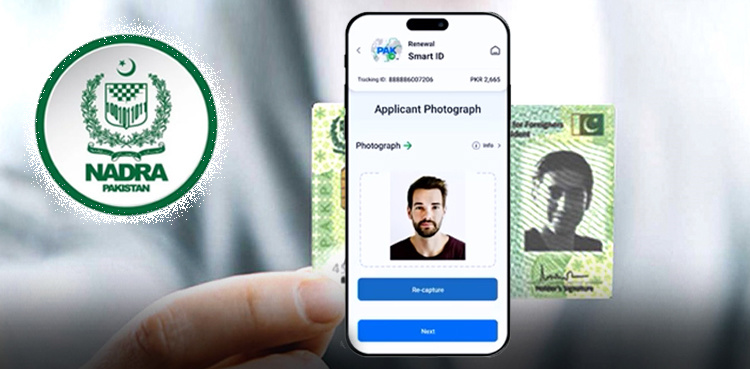
For every Pakistani citizen, a Computerized National Identity Card (CNIC) is a fundamental document used in almost every aspect of daily life — from banking and voting to travel and mobile registration. But what happens when your CNIC expires or is about to expire? Knowing how to do a CNIC renewal online can save you time, money, and unnecessary visits to a NADRA Registration Center.
In this comprehensive 2025 guide, we explain the official process to renew your CNIC through NADRA’s online portal and Pak-ID mobile app. You’ll learn exactly what to prepare, how the system works, how long it takes, how much it costs, and how to track your application until delivery.
Why Renew Your CNIC Before It Expires?
Your CNIC is valid for 10 years (with some exceptions based on age), and failing to renew it on time can cause many issues:
Your CNIC may become invalid for official processes.
Banks can block your accounts until identity is renewed.
SIM card registrations and utility service verifications may fail.
Government services like tax filing, passport processing, and voter enrollment may be disrupted.
NADRA strongly recommends renewing your card 90 days before it expires and certainly within one month after expiry to avoid disruption of services.
What Is CNIC Renewal Online?
CNIC renewal online refers to the digital process where Pakistani citizens can submit their renewal application through NADRA’s Pak-ID official mobile app or online portal. This process allows applicants to complete most of the steps from home — including uploading photos, verifying data, and paying fees — without initially visiting a physical center.
This method is part of NADRA’s digital transformation initiative to modernize identity services, reduce long queues, and make the system more accessible across Pakistan and for overseas citizens.
Who Can Use CNIC Renewal Online?
You can apply for CNIC renewal online if:
Your CNIC has expired or will expire soon.
Your CNIC is damaged, lost, or stolen.
You need to update personal details (e.g., address or photo).
You are an overseas Pakistani.
The online service is available for both residents and overseas Pakistanis, making it flexible and convenient for everyone.
Preparation Checklist (Before You Apply)
Before starting the CNIC renewal online application, make sure you have the following:
Your existing CNIC number and personal details.
A recent passport-style photograph (if required).
A valid mobile number registered in your name for OTP/verification.
Online payment method (debit or credit card, or mobile wallets).
Having these ready will ensure a smooth online renewal experience.
Step-by-Step: How to Renew CNIC Online Through NADRA
Here’s a detailed breakdown of the CNIC renewal online process:
🟢 Step 1: Install Pak-ID Mobile App (Official)
Go to Google Play Store (Android) or Apple App Store (iOS).
Search for Pak-ID — this is NADRA’s official application.
Download and install the app. ✔️
This app supports CNIC renewal, new applications, and other identity services.
🟢 Step 2: Create or Log In to Your Account
Open the Pak-ID app and register using your mobile number and email.
Verify your account through the OTP sent to your phone.
Complete initial setup if this is your first time logging in.
Using biometrics (face recognition or fingerprint) may be required to verify your identity before starting the application process.
Step 3: Start the Renewal Application
Within the app:
Select “Apply ID Card” or similar option.
Choose Renewal (or Modification if updating personal details).
Enter your CNIC number and verify.
Upload your updated photo and any supporting documents if required.
This step ensures NADRA has the latest information and image for your renewed CNIC.
Step 4: Pay the Renewal Fee
Once your form and photo are uploaded:
Choose your desired processing category:
Normal (most economical)
Urgent (faster processing)
Executive (fastest delivery)
Pay the fee online using:
Debit/Credit card
Mobile wallets (Easypaisa, JazzCash)
Online banking
Current indicative fees for CNIC renewal (2025) show Normal services around Rs. 400, with higher charges for Urgent and Executive options.
📌 Important: Overseas Pakistanis are typically charged in USD for online renewal, and home delivery also applies internationally.
Step 5: Submit and Track Your Application
After payment and form submission:
You’ll receive a tracking ID via SMS or in the app.
Use this tracking ID to monitor your renewal status within the app in real time.
NADRA may also send notifications for any required steps or updates.
You can also track CNIC renewal status using the official NADRA tracking systems or services such as the NADRA tracking and verification service online if you need extra verification assistance.
Documents Required for CNIC Renewal Online
Unlike a fresh application, CNIC renewal online usually requires fewer documents, such as:
Your expired CNIC number
Updated photograph (if uploading through app)
Proof of any changes (e.g., address or marital status)
Overseas Pakistanis should also have:
Valid Pakistani passport
Supporting identity documents for address verification
Having these ready helps avoid common delays.
Fees & Processing Time (2025)
According to the latest official updates and fee guides:
Service Type
Approx. Fee
Processing Time
Normal CNIC Renewal
Rs. ~400
~10–15 working days
Urgent Renewal
~Rs. 1,150
~5–10 days
Executive Renewal
~Rs. 2,150
~2–7 days
Overseas Renewal
$20–$35
Variable
Smart rule: choose Executive only if you need your renewed CNIC immediately.
Home Delivery of Renewed CNIC
One major benefit of CNIC renewal online is that NADRA now offers home delivery of the renewed card. Once printed, the card is sent directly to your registered address — sparing you the hassle of picking it up from a NADRA center.
This feature is especially helpful for:
Elderly citizens
People with disabilities
Overseas Pakistanis
Busy professionals
Renewal Before Expiry vs After Expiry
Renewing before expiry is always recommended. NADRA suggests renewing at least 90 days before your CNIC expires to avoid service interruptions.
If you miss the expiry date:
Your CNIC remains renewable,
But some services may be temporarily inaccessible until your renewed card is processed.
Common Errors & How to Avoid Them
❌ Incorrect Details
Mistakes in name spelling or address can delay your renewal. Always double-check before submitting.
⚠️ Uploading Low-Quality Photos
Blurry or unclear photos can lead to verification failure. Use a well-lit photo that matches NADRA guidelines.
🚫 Fake Third-Party Sites
NADRA has warned against unauthorized websites and services claiming to renew CNICs for a fee. Always use the official Pak-ID app or the official web portal.
Overcoming Challenges During Online Renewal
If your application is on hold:
Check the tracking status in the app.
Visit the nearest NADRA center if requested biometric verification.
Contact NADRA helpline (111-786-100) for clarifications.
If your record needs additional confirmation (e.g., address updates), NADRA may contact you with instructions — so keep your phone active.
To support your CNIC renewal journey, explore these related guides on ExploreItBeyond:
✔ Renew your CNIC before expiry — avoid penalties and service loss. ✔ Always use the official Pak-ID app or the government portal. ✔ Keep your documents and contact details updated. ✔ Pay for services only within the official app or portal.
Conclusion
CNIC renewal online through NADRA’s portal and Pak-ID app is a major step forward in digital governance for Pakistan. It provides a secure, convenient, and efficient way to renew your identity card from the comfort of your home. By following the step-by-step procedure outlined above, preparing your documents, and using the official channels, you can complete your renewal with minimal hassle and enjoy uninterrupted access to essential services.
Whether you choose Normal, Urgent, or Executive processing, online renewal gives you flexibility and peace of mind — especially when combined with home delivery and real-time tracking.
Frequently Asked Questions (FAQs)
What is CNIC renewal online?
CNIC renewal online is a digital service provided by NADRA that allows Pakistani citizens to renew their expired or expiring CNIC using the official Pak-ID mobile app or online portal without visiting a registration center initially.
Who can apply for CNIC renewal online?
Any Pakistani citizen whose CNIC has expired or is close to expiry can apply for CNIC renewal online. The service is also available for overseas Pakistanis.
Which app is used for CNIC renewal online?
NADRA’s official Pak-ID mobile app is used for CNIC renewal online. It is available on both Android and iOS platforms.
What documents are required for CNIC renewal online?
Generally, only your existing CNIC details are required. Additional documents may be needed if you are updating your address, marital status, or other personal information.
How much does CNIC renewal online cost?
The fee depends on the service category. Normal processing costs around Rs. 400, while Urgent and Executive services cost more. Overseas fees are charged in USD.
How long does CNIC renewal online take?
Normal CNIC renewal online usually takes 10–15 working days. Urgent and Executive services are processed faster.
Can I get my renewed CNIC delivered at home?
Yes, NADRA provides home delivery for CNIC renewal online. The renewed CNIC is sent to your registered address once processing is complete.
How can I track my CNIC renewal application?
You can track your CNIC renewal online using the tracking ID provided after submission through the Pak-ID app or NADRA’s tracking services.
Is it safe to renew CNIC online?
Yes, CNIC renewal online is secure when done through NADRA’s official Pak-ID app or website. Avoid third-party agents or unofficial websites.
What should I do if my online renewal application is rejected?
If your application is rejected, check the reason in the Pak-ID app, correct any errors, or visit the nearest NADRA Registration Center if biometric verification is required.