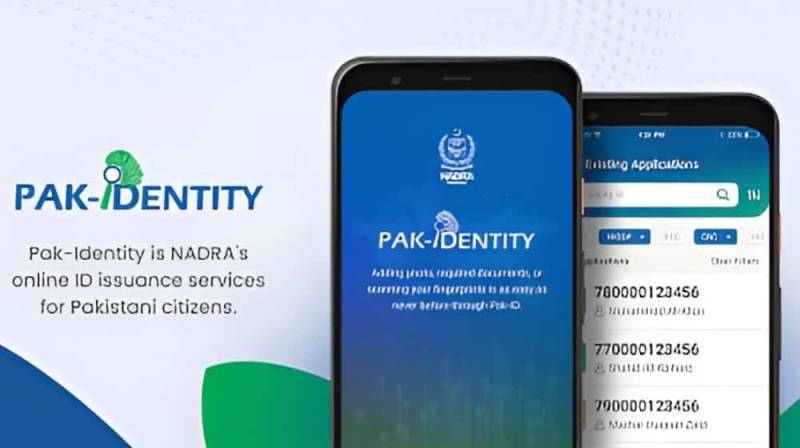
Applying for a Computerized National Identity Card (CNIC) is a legal requirement for Pakistani citizens above the age of 18. With NADRA’s digital services, it is now easier than ever to apply CNIC online Pakistan without unnecessary visits or long queues. Through the Pak-Identity portal and mobile app, most of the process can be completed online, saving both time and effort.
This detailed guide explains how to apply CNIC online Pakistan, covering eligibility, documents, fees, biometrics, and tracking — all in one place.
What Is CNIC and Why Is It Important?
The Computerized National Identity Card (CNIC) is issued by NADRA and is required for:
- Opening bank accounts
- Getting a passport
- Buying or selling property
- Voting in elections
- Accessing government services
Without a valid CNIC, many essential services remain inaccessible.
Related read: What Is CNIC and Why It Is Important in Pakistan
Who Can Apply for CNIC Online in Pakistan?
You can apply online if you fall under any of these categories:
- Pakistani citizen aged 18 years or above
- First-time CNIC applicant
- CNIC renewal or reprint applicant
- CNIC modification (name, address, marital status)
For overseas Pakistanis, NADRA provides NICOP through the same Pak-Identity system.
Related Read: Difference Between CNIC and NICOP
Documents Required to Apply CNIC Online
Before starting, keep the following documents ready (requirements may vary by case):
- B-Form or birth certificate (for first-time applicants)
- Parents’ CNIC copies
- Old CNIC (for renewal or reprint)
- Proof of residence (if required)
- Passport-size photograph (clear background)
Uploading clear and accurate documents helps avoid application rejection or delays.
Step-by-Step: How to Apply CNIC Online in Pakistan
Step 1: Create an Account on Pak-Identity
Visit NADRA’s Pak-Identity portal or download the Pak-Identity mobile app. Register using:
- Valid email address
- Active mobile number
After verification, log in to your account.
Step 2: Start a New CNIC Application
Once logged in:
- Select the relevant CNIC service (new, renewal, modification)
- Enter personal details carefully
- Choose your preferred NADRA Registration Center (NRC)
Ensure spellings and dates exactly match your official documents.
Step 3: Upload Documents and Photograph
Upload scanned copies of required documents. If using the mobile app, you can take a live photograph that meets NADRA’s standards.
Poor image quality is a common reason for application rejection, so ensure clarity.
Step 4: Pay the CNIC Fee Online
Depending on the service type, you may be required to pay a fee:
- Normal processing
- Urgent processing
- Executive processing
Payments can be made online via debit or credit card. Save the payment receipt for future reference.
Must Read: Latest NADRA CNIC Fee Structure
Step 5: Visit NADRA Registration Center for Biometrics
Even though you apply CNIC online Pakistan, biometric verification is mandatory. At the NRC:
- Fingerprints are captured
- Facial verification is completed
- Original documents are checked
You will receive an acknowledgment slip after verification.
Step 6: Track CNIC Application Status
After submission, you can track your application using:
- Pak-Identity dashboard
- SMS tracking service (where available)
Delivery timelines depend on the selected service type.
Must Read: How to Get Nadra Tracking and Verification Service Online
CNIC Processing Time in Pakistan
Approximate timelines:
- Normal: 30–45 days
- Urgent: 15–20 days
- Executive: 7–10 days
Processing times may vary depending on workload and verification requirements.
Common Mistakes to Avoid
- Incorrect name spelling
- Uploading unclear documents
- Using expired parent CNICs
- Skipping biometric appointment
Avoiding these mistakes ensures your apply CNIC online Pakistan process goes smoothly.
Can Overseas Pakistanis Apply CNIC Online?
Yes. Overseas Pakistanis can apply for NICOP using Pak-Identity. The process is similar, with biometric verification completed through designated NADRA centers or Pakistani embassies abroad.
Must Read: How to Apply for NICOP Online
Final Thoughts
The digital system introduced by NADRA has made it significantly easier to apply CNIC online Pakistan with minimal hassle. By completing the form online, uploading documents correctly, and attending biometric verification on time, applicants can receive their CNIC smoothly and efficiently.
Whether you are applying for the first time or renewing an existing card, following this guide will help you avoid delays and errors.
Frequently Asked Questions (FAQs)
Can I apply CNIC online in Pakistan?
Yes, Pakistani citizens can apply CNIC online in Pakistan through NADRA’s Pak-Identity portal or mobile application. While most of the process is completed online, biometric verification must be done in person at a NADRA Registration Center.
What documents are required to apply CNIC online?
For most applicants, required documents include a B-Form or birth certificate (for first-time applicants), copies of parents’ CNICs, and an existing CNIC for renewal or modification. Additional documents may be requested depending on the case.
Is biometric verification mandatory after online CNIC application?
Yes, biometric verification is mandatory. After submitting your online application, you must visit a NADRA Registration Center for fingerprint and facial verification before your CNIC can be processed.
How long does it take to receive CNIC after applying online?
The processing time depends on the selected service. Normal processing usually takes 30–45 days, urgent processing takes around 15–20 days, while executive service may deliver the CNIC within 7–10 working days.
How can I track my CNIC application status?
You can track your CNIC application status through the Pak-Identity online portal using your application number or tracking ID. NADRA also provides SMS tracking for certain services.
Can overseas Pakistanis apply for CNIC online?
Yes, overseas Pakistanis can apply online for NICOP through the Pak-Identity system. Biometric verification is completed at designated NADRA registration centers or Pakistani embassies and consulates abroad.